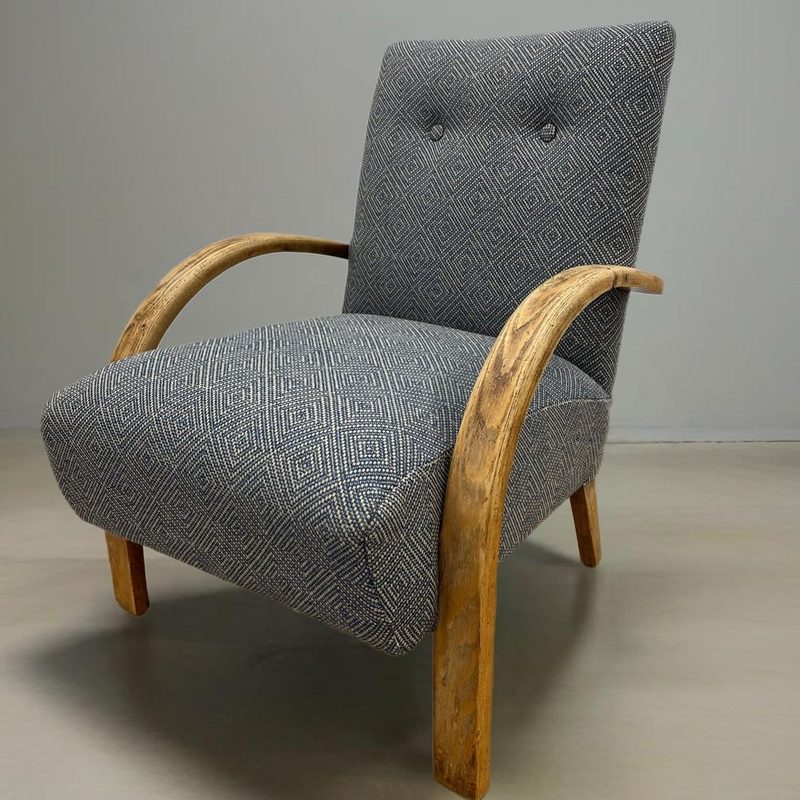
 The chair
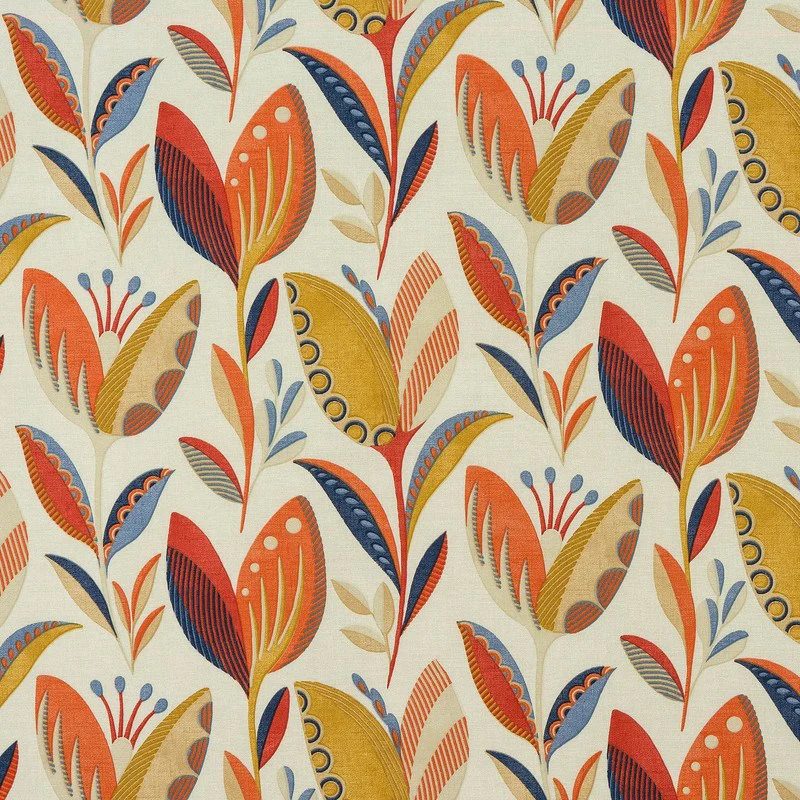 The fabric
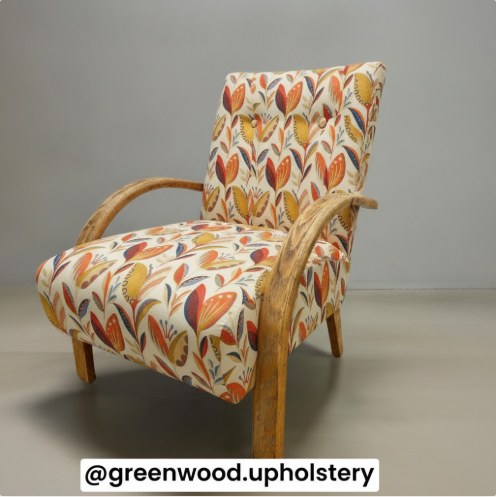 Twenty seconds later
Free · three tries an hour · this is an AI impression: pattern scale and seams are approximate — your upholsterer will show you the real thing. Photos are processed to make your picture and are not kept.
Getting a good result — the two photos
The tool is only ever as good as what you feed it, and two minutes of care with the photos roughly doubles the realism. Here’s what thirty years of looking at chairs suggests.
The furniture photo
Fill the frame with the piece. This is the single thing that decides whether the result is any good. If the chair or sofa sits nicely in the picture with only a little room around it, the tool has plenty to work with; if it’s a small chair marooned in a large room, there isn’t enough of it in the photo and the result comes back vague. Get close, and crop out what isn’t furniture.
Shoot from an angle, not straight on. Stand to one corner so you can see three faces at once — the front, the outside arm, and a little of the inside back. That gives the tool the shape of the piece rather than a flat elevation of it, and it’s how a photographer would shoot a chair for a catalogue.
Keep the background quiet. Clear the throws, the cushions from other suites, the toys and the clutter, and pull the piece away from a busy background if you can — a plain wall behind it is ideal. Whatever is in the photo stays in the picture. Daylight from a window beats everything; skip the flash, which flattens texture and throws hard shadows the tool can read as marks on the cloth.
The fabric photo
Lay the swatch flat and smooth it — iron it if it’s been folded, because creases come through as shading. Shoot square-on from directly above, cloth filling the frame edge to edge, in daylight with no shadow falling across it. If the fabric is patterned, get at least one full repeat in the shot so the scale has a chance of reading true; if it has a sheen, tilt until the glare goes. A supplier’s flat product photo of the fabric works well too.
Colour and the overall look: good. Pattern scale, drape, pile direction and seam placement: approximate. Use it to answer the first question — roughly right, or plainly wrong? — and let your upholsterer’s real sample on the real piece answer the rest. That isn’t a limitation to apologise for; it’s the correct order of decisions.
Why see it first
Fabric is the biggest single cost of a re-cover and the one mistake that can’t be quietly fixed — once the metres are cut, they’re yours. Every upholsterer has met the customer holding a beautiful swatch that became a sofa they can’t live with. Two photos and twenty seconds before you order is the cheapest insurance in the trade. When the answer looks right: work out how much you’d need, check it against the UK fire regulations if it’s for a home, read how to choose fabric that lasts — then find an upholsterer or learn to do it yourself.
Visualiser Pro is this tool built for the trade: no hourly limits, full-resolution downloads, and printable choice sheets — one chair in up to four fabrics with your logo and prices, ready to hand to the customer. £39.99 for 100 images — paid once, not monthly, topped up when it runs out. Photos can be taken straight from the app on site, and it installs on the shop phone like an app.
Questions this tool answers
Can I see what my chair would look like in a different fabric?
Yes - upload a photo of your chair or sofa and a photo of the fabric swatch, and the visualiser shows your furniture re-covered in that fabric within about twenty seconds. It's free, three tries an hour, and the result is emailed to you.
How accurate is the fabric visualisation?
It's an AI impression to help you imagine the finish - the colour and overall look are good, but pattern scale, drape and seam placement are approximate. A professional upholsterer will show you the real thing with a proper sample on the piece.
What photos work best?
For the furniture: the whole piece, straight on, in decent light. For the fabric: a flat, square-on photo of the swatch filling the frame. Phone photos are fine - both are resized automatically.
Is there a free way to see fabric on my own sofa before buying?
Yes — this one. Upload a photo of your sofa, chair, stool or headboard and a photo of the fabric, and the visualiser shows the piece re-covered in about twenty seconds, free, with the picture emailed to you. No account, no app to install.
How should I photograph a fabric swatch for the visualiser?
Flat, smooth, square-on from directly above, filling the frame, in daylight. Iron out creases (they read as shading), keep shadows and glare off the cloth, and if it’s patterned include at least one full repeat so the scale reads true. A supplier’s flat product photo also works.
Can I try more than one fabric on the same chair?
Yes — you get three visualisations an hour, which is exactly a shortlist: try your two or three contenders on the same photo of the piece and compare like for like. There’s also a daily limit shared across all visitors, so if today’s are gone, it refills overnight.